
Overspeed incidents in Fleetpin show users when, where, and for how long a vehicle has been driven above a set speed limit.
To ensure reporting is both accurate and easy to understand, Fleetpin uses an event → incident model. Rather than treating every speed reading separately, Fleetpin groups related speeding data together. When a vehicle goes over the speed limit, a speeding event is recorded. If the vehicle continues to exceed the limit, those events are combined into a single overspeed incident, representing one continuous speeding period.
What Is an Overspeed Incident?
An overspeed incident represents one continuous period of time where a vehicle is travelling above a specific speed limit.
Fleetpin records individual speeding events whenever a speed reading is over the speed limit. These events are then grouped together to create an overspeed incident using the following rules:
- A single point overspeed incident is created when only one speeding event occurs
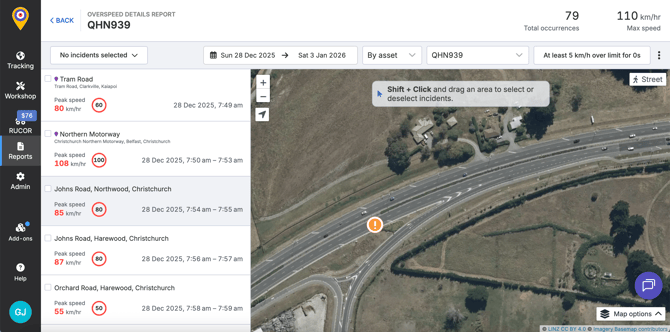
- A sustained overspeed incident is created when multiple speeding events occur in succession across multiple GPS pings
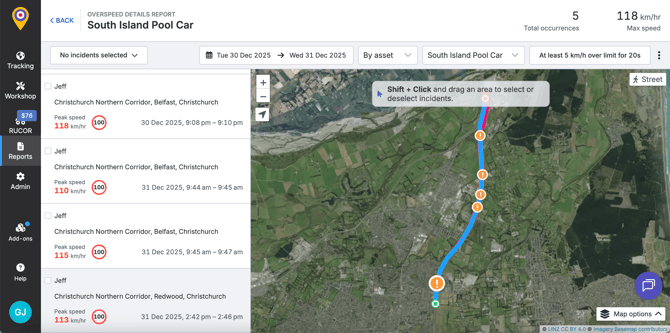
- If the applicable speed limit changes while the vehicle is still speeding, the current incident ends and a new one begins
Both incident types are valid. The difference simply shows how long the vehicle stayed over the speed limit.
What Is a Speeding Event?
A speeding event is a single, timestamped data point where the vehicle reports a speed reading, and that speed is greater than the speed limit at that moment.
Events are generated from regular GPS updates sent by the vehicle device.
How Overspeed Incidents Are Created
Overspeed incidents are created by grouping speeding events together while the vehicle remains above the same speed limit.
A breakdown of how the incidents are created:
- Fleetpin receives a speed reading from the vehicle device
- If the speeding is over the applicable speed limit, a speeding event is recorded
- The first speeding event starts an overspeed incident
- Each successive speeding event while the vehicle remains over the limit extends the same incident
- If the applicable speed limit changes while the vehicle is still speeding (for example due to a new road limit or entering a location with a different fixed limit), the current incident ends and a new overspeed incident starts
- When the vehicle speed returns within the applicable speed limit, the overspeed incident ends
This ensures that each overspeed incident is always tied to one specific speed limit, making reports clearer and easier to interpret.
Speed Event Frequency and Accuracy
How often a vehicle sends GPS updates affects how precisely Fleetpin can measure the start and end of an overspeed incident.
- More frequent GPS updates allow Fleetpin to calculate start and end timing more accurately
- Less frequent updates may result in slightly rounded or conservative incident durations
Overspeed incidents represent the best possible estimate based on the available data, rather than second by second tracking.
This is why the charts in the harsh driving report show individual data points rather than a continuous line.
How Does Fleetpin Determine the Speed Limit?
Overspeed detection compares vehicle speed against one applicable speed limit at any given point in time. That speed limit is chosen using a clear priority order, based on what information is available at the time.
Speed Limit Priority Order
When multiple speed limits are present, Fleetpin applies the following priority logic:
- Asset speed limit
- If an asset-level speed limit is set and it is lower than or equal to the applicable location or road speed limit, the asset speed limit is used.
- Location speed limit
- If a location speed limit (from a geofence or location group) is present, it is used when no stricter asset speed limit applies.
- Road speed limit
- If no asset or location speed limits apply, Fleetpin uses the posted road speed limit for the vehicle’s location.
- Default speed limit
- If no speed limit information is available, a default limit of 100 km/h is applied
This approach ensures Fleetpin always uses the most sensible and conservative speed limit, prioritising the limits users have defined where possible.
What Data Is Used for the Overspeed Report?
Overspeed reporting relies on a combination of vehicle data and speed limit data from multiple sources
Vehicle and Event Data
- GPS position - used to determine vehicle location and applicable speed limits
- GPS speed - the primary speed value used for overspeed detection
- Timestamped device data - used to calculate incident timing and duration
Speed Limit Data Sources
Fleetpin determines applicable speed limits using the following sources:
- Road speed limits
- Fleetpin uses posted road speed limit data sourced from the National Speed Limit Register (NSLR) where available
-
- In areas where NSLR data is unavailable, incomplete, or does not fully describe the road segment, Fleetpin may supplement this with OpenStreetMap (OSM) speed limit data to ensure the most accurate applicable limit is used
- Asset speed limits
- Defined by users within the Fleetpin app
-
- Applied directly to individual assets or asset groups
- Location speed limits
- Defined by users within the Fleetpin app
-
- Applied directly to individual locations (geofences) or location groups
All overspeed incidents are generated automatically based on these data sources and the prioritisation rules described above.
Data Accuracy and Filtering
Fleetpin filters overspeed events to reduce false positives and ensure incidents are based on reliable data.
GPS Quality Filtering
Speeding incidents are only created when GPS data meets minimum quality requirements. Events may be ignored if GPS quality is considered poor.
Fleetpin evaluates GPS quality using factors such as:
- Horizontal dilution of precision (HDOP)
- Number of satellites used to determine the position
These inputs are combined into a GPS quality score. Only events above a defined quality threshold are eligible to create or extend overspeed incidents.
This quality assessment is consistent with the GPS quality indicators shown in the Trips view, helping ensure alignment between trip data and overspeed reporting.
Like all GPS-based systems, overspeed reporting can occasionally be affected by environmental or signal-related factors. For this reason, overspeed data should be used as a behavioural and safety indicator, not a legal enforcement record.
Using Overspeed Data Effectively
Overspeed data is most effective when used to identify patterns, not isolated incidents.
We recommend using overspeed and harsh driving reports to:
- Highlight repeated speeding behaviour
- Support driving coaching discussions
- Measure improvement over time
- Understand risk exposure across vehicles, drivers, and locations