.svg)
What is RUC Assist?
RUC Assist automates the purchase of Road User Charges (RUC) for your fleet. Instead of tracking expiry distances and manually buying licences, Fleetpin handles the process for you. It is designed to take away the inefficiency and unreliability of manual RUC purchases at a price that makes it a financial benefit, not an additional cost to customers.
How It Works
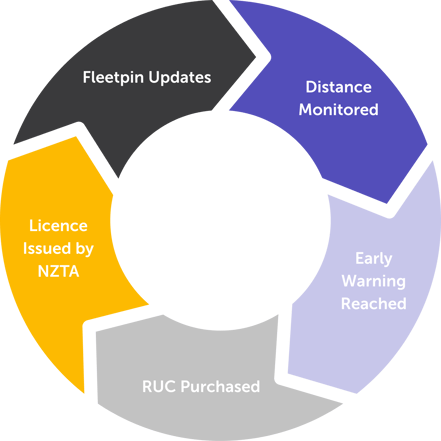
When RUC Assist is enabled for an asset, Fleetpin monitors the vehicle's distance travelled alongside its current RUC licence. When the remaining distance drops below your configured purchase threshold, Fleetpin automatically purchases the required RUC on your behalf.
NZTA issues the new licence, with the physical label sent to the registered address held on NZTA's records for that vehicle. A digital copy is emailed to you. The updated expiry distance is then synced back into Fleetpin so the process continues. This sync may not be immediate.
You manage purchasing rules through profiles, which let you configure how many RUC units to buy and when to trigger a purchase for different groups of vehicles. See this article for more information on profiles.
Things to Know
- RUC Assist is only available to assets that are subject to Road User Charges.
- Purchase requests are raised the morning after a threshold is crossed. They are not instant.
- Purchase thresholds should be set with a five business day processing buffer in mind. This gives time for the new label to arrive before the current licence expires.
- If a vehicle's RUC licence expires before a new one is processed, it will be flagged as overdue in the assets table. Setting your purchase threshold with enough headroom will prevent this in most cases.
- RUC Assist includes all NZTA Sync functionality at no extra charge. In addition to RUC syncing, WoF, CoF, and registration syncing are included and updated in Fleetpin automatically.
- Disabling a profile stops all automatic purchasing for assets on that profile, but does not unsubscribe them from the add-on.
- Deleting a custom profile moves its assets to the default profile. It does not disable purchasing for those assets.
- Customers are responsible for ensuring the vehicle's odometer or hubodometer is accurate and kept up to date in Fleetpin. RUC Assist uses this data to determine when to purchase, so inaccurate readings can affect timing.
- A GoCardless direct debit must be set up on your account for automatic payment processing.
Get Started With RUC Assist
To get started and set up RUC Assist check out this article for more information.
Get Help
If you have any further questions or need assistance, get in touch with the Fleetpin team. You can use the chat icon in the bottom right of the app, or call us on 0800 110 820.